To check if your pet’s microchip is registered, you need the chip’s number and about ten minutes with the Pet Microchip Registry Lookup run by the American Animal Hospital Association (AAHA), which searches the US registries that take part. This guide follows that tool as it worked on October 18, 2026, and uses PetLink’s account pages as the worked example of a registry. It applies to any dog or cat with a chip sold in the US. At the end you’ll know which company holds the record, whose name is on it and whether its phone number still reaches you. The lookup’s “This pet is registered” heading only means a record exists somewhere. The contact on that record can still be the shelter, the breeder or a previous owner, and AAHA’s tool doesn’t show which.
Before you start
- Have the microchip number at hand, or plan a vet or shelter visit to read it.
- Think of the email address a shelter or vet may have used to register the chip for you.
- Keep one proof-of-ownership document in your name nearby, such as the adoption agreement, in case the record needs a transfer.
- Have a phone ready for registries that work by call.
Find the microchip number
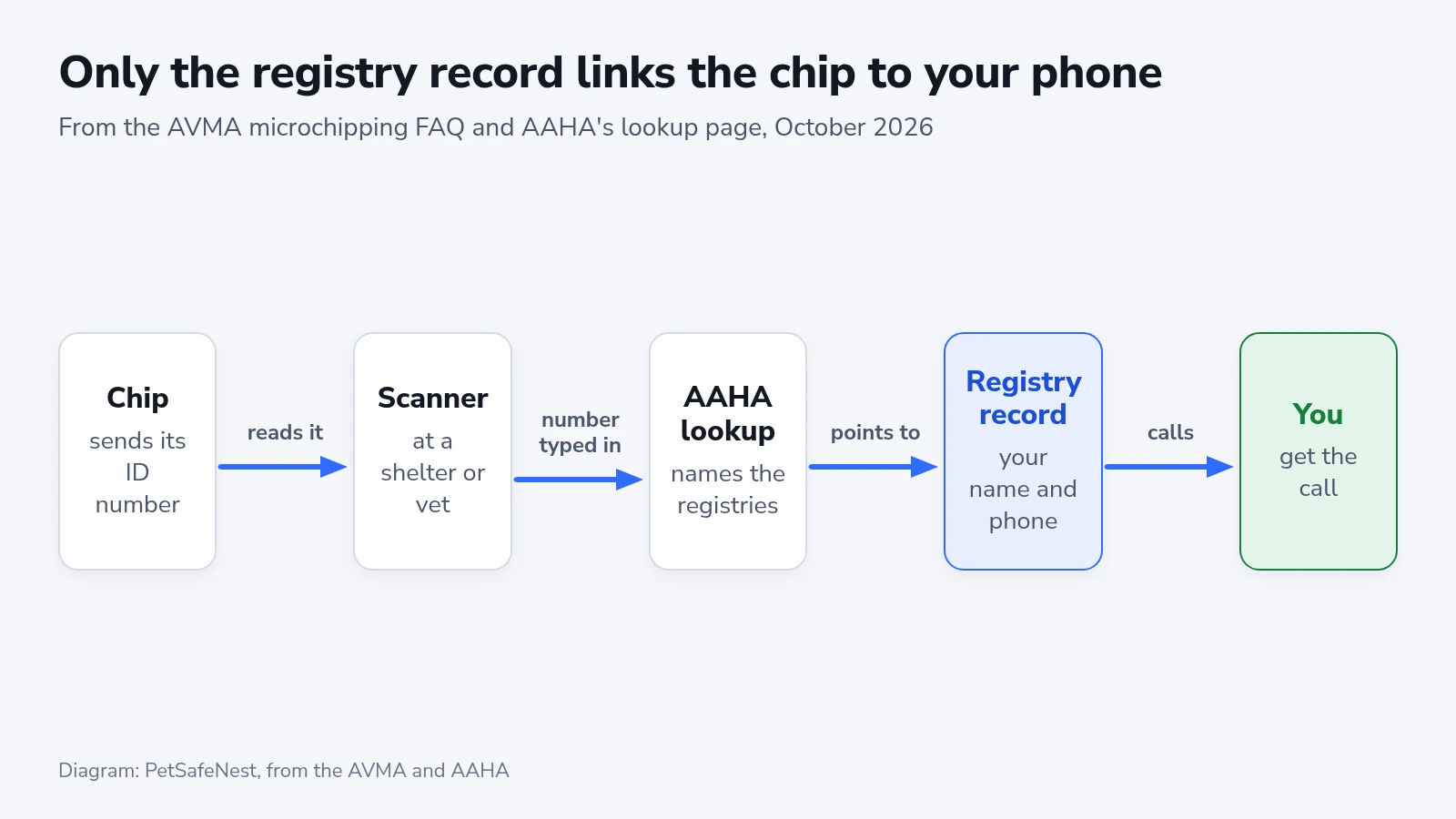
The chip carries an ID number, and on some models a body-temperature reading, but nothing about you. The American Veterinary Medical Association (AVMA) describes a glass capsule about the size of a large grain of rice, with no power source, that sends its ID number when a scanner passes over it. It is not a GPS device and can’t show where your pet is, which is the job of a GPS tracker on the collar. Your name, phone number and address sit in a registry’s database, and the US has no single central one.
- Look through the adoption agreement, the vet invoice from the visit when the chip went in, and the barcode sticker from the chip’s packet. On a PetLink chip the sticker carries a 15-digit number that starts with 981.
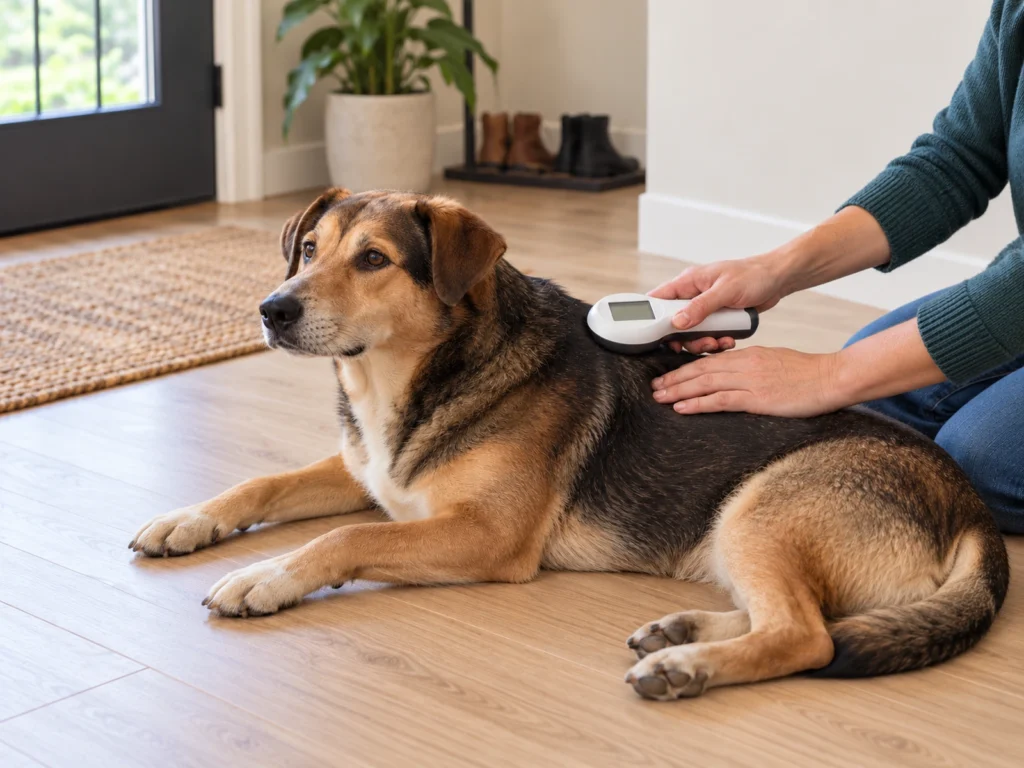
- If none of those turn up, ask your vet or the shelter to scan your pet. The AVMA says most clinics keep scanners and many shelters chip the animals they adopt out, so ask the shelter for the number if your new pet came from one.
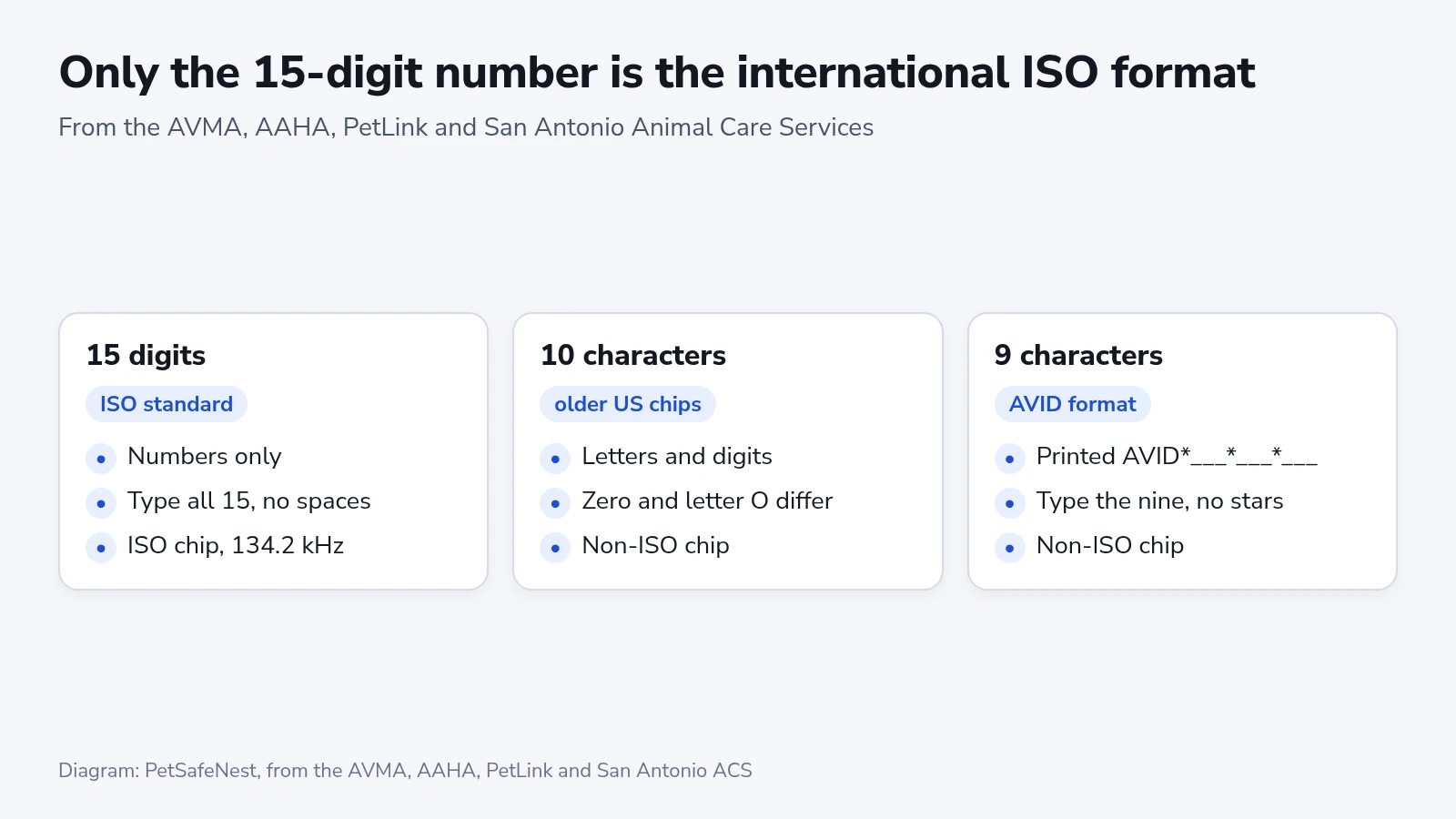
- Copy the number one character at a time and count the characters. AAHA’s tool takes 9, 10 or 15.
A 15-digit number made only of digits is the ISO standard, read at 134.2 kHz, and many countries require that type before a dog or cat can enter. Nine- and ten-character numbers belong to older non-ISO chips, and they can mix letters and digits. PetLink’s help pages say people often mix up the number 0 and the letter O in those. AVID’s nine-character chips are often printed as the word AVID followed by three groups of three characters, with asterisks between the groups. Type only the nine characters, because AAHA’s box takes no spaces or punctuation.
If you plan to travel abroad with a pet whose number has 9 or 10 characters, ask your vet about adding a 15-digit chip. The AVMA says two chips don’t interfere with each other, and each one needs its own registration. A dog coming back into the US needs a chip too, but it can be any type a universal scanner reads.
Run the AAHA lookup
AAHA’s tool asks each participating registry whether it holds a record for the number and lists the ones that do, with their phone numbers. It shows no owner details and can’t change a record. On October 18 the page named 40 microchip registries, among them AKC Reunite, HomeAgain, PetLink and 24Petwatch, and it searches only companies that chose to take part.
- Open the Pet Microchip Registry Lookup on AAHA’s website. A search for “AAHA microchip lookup” finds it.
- Type the number into the box under “Enter the pet’s 9-, 10-, or 15-digit microchip number”, with no spaces or punctuation, and click “Enter”.
- Read the heading. “This pet is registered” means at least one registry holds a record for that number.
- Note the registry on the top card and its “LAST UPDATED” date. AAHA sorts the results so the most recently updated record comes first, and each card gives the registry’s website and phone number.
- Check the bottom of the page for “REGISTRY SEARCHES FAILED”. Those registries couldn’t be reached, and AAHA’s advice is to search again later.
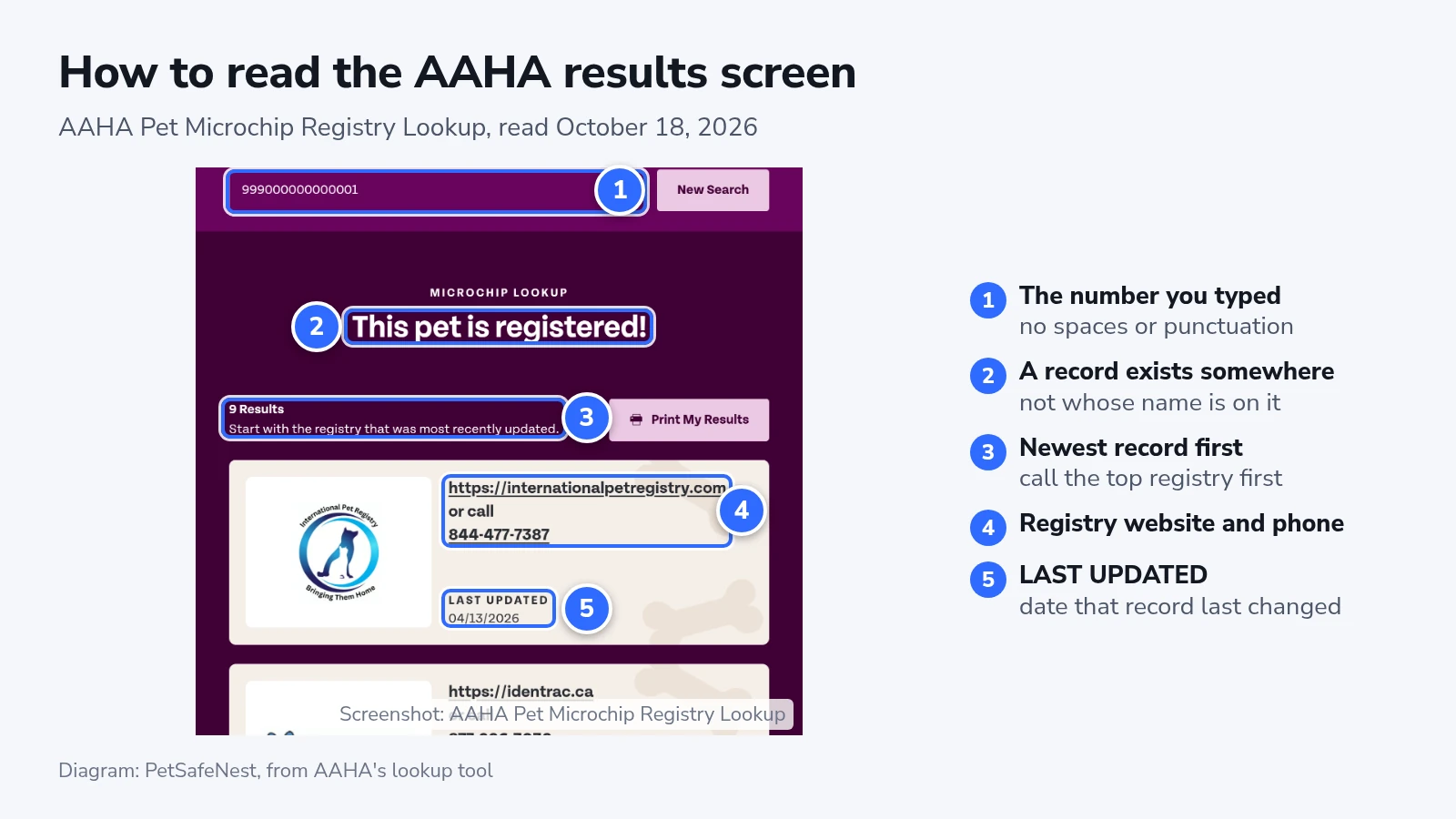
A “LAST UPDATED” date earlier than the day your pet came home means that record was last edited before you owned the pet.
AAHA says many numbers starting with 900 can’t be traced to a single maker, so the list gives you several companies to try. Save This Life, a registry that closed and was disconnected from the lookup, is why AAHA flags numbers starting with 991 or 900164. Owners of those chips may need to register the same chip with another company, and AAHA says the chip itself doesn’t need to be replaced.
The “I lost my dog or cat” option on the same page asks whether the pet is chipped and points you to its registry to report it lost, one of the first calls on a lost dog or cat checklist.
Ask the registry whose name is on the record
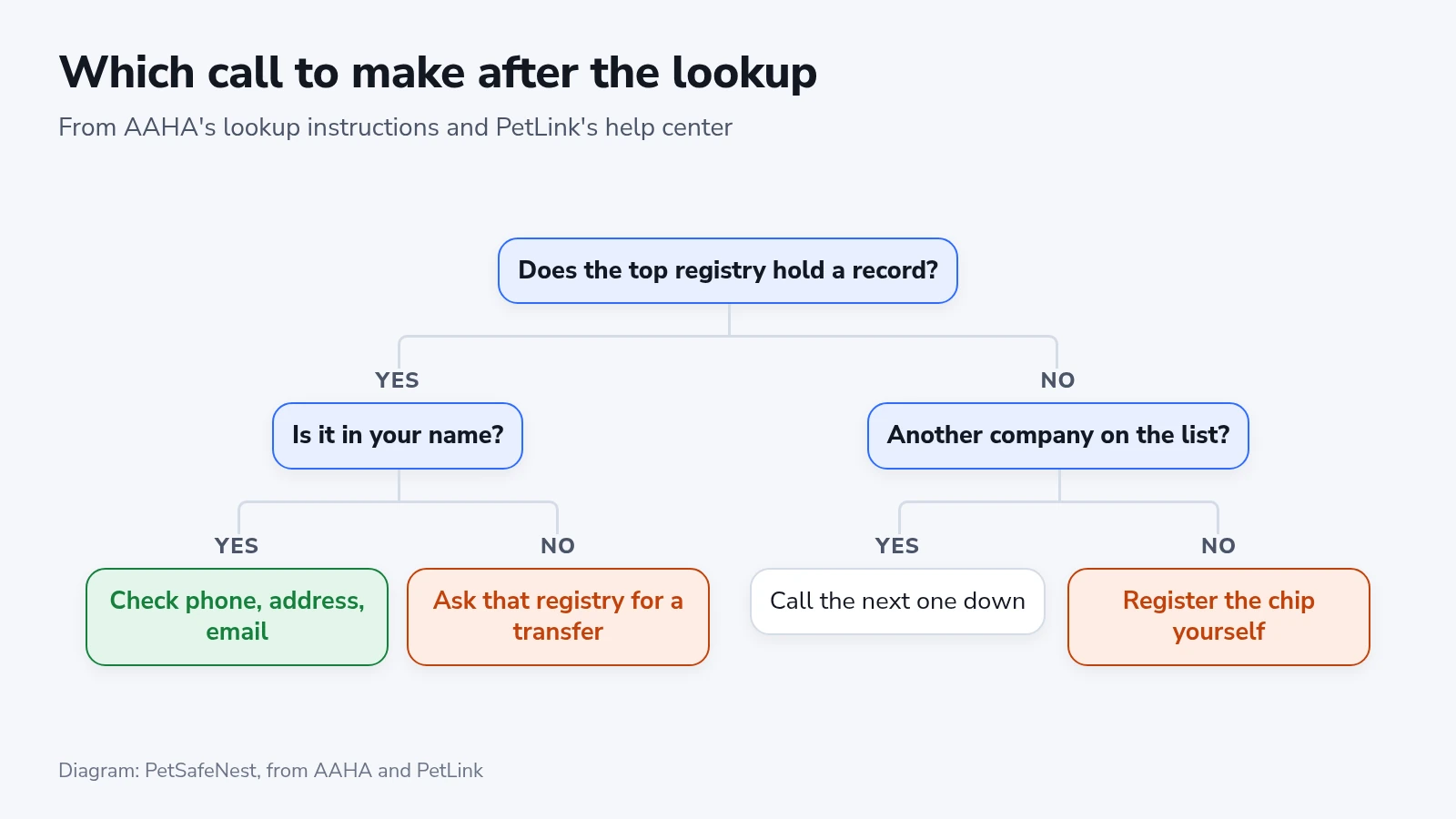
AAHA’s instruction is to start with the first company listed and work down until one confirms it holds the owner’s details. The lookup won’t show those details, and PetLink, for one, shares them only with animal professionals or when a pet is found, so you confirm them by logging in or by phone.
- Open the top registry’s website or call the number on its card.
- Ask whether it holds a record for your pet’s number and whose contact details are on it, or log in if you already have an account.
- If you never made an account, try the registry’s account recovery with the chip number. PetLink’s help center says vets, shelters and rescues often register a chip on the owner’s behalf, so the account may already be in your name.
- If the company has no record, move to the next one on AAHA’s list.
Update a PetLink record
Every registry record needs the same three things checked, according to the AVMA: your phone numbers, email and address. PetLink’s menus below are its own, and other registries name theirs differently.
- Open PetLink’s “Find my Account” page and enter the chip number.
- Read the partial email address the page shows. Access instructions go to that address, and if you don’t recognize it, contact PetLink support with the chip number.
- Log in, then click “View Profile” under your pet’s name.
- Click “Edit” on the section that’s out of date, such as your phone number.
- For a new address, click “Owner Info” (between “My Pets” and “Payments”), then “Edit” in the “Addresses” menu, and finish with “Save Changes”.
- Add an alternate contact. PetLink allows two, and a second phone number covers the hours when yours is switched off.
No transfer and no fee are needed when the vet, shelter or rescue registered the chip in your name, according to PetLink.
When the record is in someone else’s name
A record that names the shelter, the breeder or a previous owner needs a transfer, and each registry runs its own process. PetLink charges a one-time $29.99, and either side can start it.
- The current owner logs in, opens the pet’s profile, clicks “Transfer Ownership” and enters your email. You confirm and pay.
- You click “Transfer a Pet” on PetLink’s home page, validate the chip number, enter your details, upload proof of ownership and pay.
The accepted documents are an adoption agreement, a current pet license, a current rabies certificate or vet bills dated within the last 12 months, and the name on the document has to match the new account. AKC or CFA registrations, medical records, and rabies or license tags don’t count. Before you pay, ask the shelter whether it has a PetLink professional account and is listed as your pet’s Guardian. A shelter in that position can transfer the chip to you at no cost.
When every company on AAHA’s list says it has no record, the chip was never registered with a registry that AAHA searches. Register it with the maker’s registry or with another participating registry. Fees differ, and PetLink charges a one-time $29.95 to register a chip made by another company.
If it doesn’t work
If the registry rejects the number as invalid, retype it and check every 0 and O. If it still fails, PetLink asks for a clear photo of the chip’s barcode sticker and the name of the clinic that implanted it, so its staff can verify the number.
A registry message saying the chip is already registered most often comes from a typo, according to PetLink. If the number is right, a vet, shelter or rescue may have registered it for you, and the account recovery in step 3 of the registry check finds that account.
PetLink lists three causes when the vet’s scanner finds nothing. The scanner may not be universal, or it may be too old to read ISO chips. The chip may have migrated away from the shoulder blades, or it may have fallen out soon after it went in. Ask for a whole-body scan, or a scan at another clinic or shelter. An X-ray shows whether the chip is still there, and if it isn’t, your pet needs a new chip and a new registration. The AVMA adds that long matted hair, fat at the implant site and a collar with a lot of metal on it can get in the way of a scan.
When some registries appear under “REGISTRY SEARCHES FAILED”, run the search again later, since one of them may hold the newest record.
Check that it worked
- Run the AAHA lookup again after the change. AAHA sorts the list by the last update, so the registry you edited should move to the top with a newer “LAST UPDATED” date.
- Look further down the list for older records with someone else’s details, and call those registries too. AAHA tells finders to work down the list when the top company has no owner details, so an old record can still be the one they reach.
- Ask your vet to scan the chip at least once a year, the AVMA’s interval for confirming it still reads.
- Update the record the day you move or change your phone number, and check it again every August 15, which the AVMA marks as Check the Chip Day.